
Your payroll team ran 24Q returns every quarter without a hitch. Then April 2026 arrived. You log into TRACES to start the Q1 return, and Form 24Q is simply not there. No error message. Just gone. Three calls to your CA later, someone finally mentions: “It’s Form 138 now. New Income Tax Act.” That’s an unpleasant way to discover a major change — especially when Q1 was due July 31.
Q2 (July–September 2026) closes on September 30. Your Form 138 salary TDS return is due October 31, 2026. That gives you about five weeks. This guide walks you through exactly what changed, how to compute TDS correctly, and how to file without scrambling at the last minute.
Quick Answer (TL;DR)
- Form 24Q is now Form 138 under the Income Tax Act 2025, effective April 1, 2026
- Q2 FY 2026-27 (July–September 2026) filing deadline: October 31, 2026
- Late fee: ₹200 per day under Section 234E starting November 1
- Additional penalty under Section 271H: ₹10,000 to ₹1,00,000 for major delays or incorrect filing
What Is Form 138 — and Why Form 24Q No Longer Exists
Form 138 is the quarterly TDS statement filed by employers for tax deducted on salary payments. It is the direct replacement for Form 24Q under the new Income Tax Act 2025, which supersedes the Income Tax Act 1961 from April 1, 2026 onwards.
Here is what changed and what stayed the same:
| Parameter | Old (up to March 31, 2026) | New (from April 1, 2026) |
|---|---|---|
| Form name | Form 24Q | Form 138 |
| Governing law | Income Tax Act 1961 | Income Tax Act 2025 |
| Section for TDS on salary | Section 192 | Section 392 |
| Filing rule | Rule 31A | Rule 219 |
| Form for other payments | Form 26Q | Form 140 |
| Who files | All employers | All employers (no change) |
| Monthly deposit deadline | 7th of next month | 7th of next month (no change) |
The underlying logic — compute annual tax liability, divide by remaining months, deduct monthly, deposit by 7th, report quarterly — has not changed. What changed is the form number, section references, and the portal’s filing interface on TRACES. Any HR software or payroll tool that has not updated to Form 138 is now giving you outdated output. Check with your vendor.
Does Form 24Q still apply at all?
Yes, but only for the past. Salaries paid up to March 31, 2026 are still governed by the Income Tax Act 1961. If you have any revised returns or corrections for FY 2025-26 or earlier, you still use Form 24Q with the old section numbers. Going forward — everything from April 1, 2026 — is Form 138.
Who Must File Form 138 and When
Every employer who deducts TDS on salary under Section 392 of the Income Tax Act 2025 must file Form 138 quarterly. This includes proprietorships, partnerships, private limited companies, LLPs, and government departments. There is no minimum headcount exemption — even a company with two salaried employees above the taxable threshold must file.
Q2 2026-27 Key Dates
| Quarter | Period | TDS Deposit Deadline | Return Filing Deadline |
|---|---|---|---|
| Q1 | April–June 2026 | 7th of each following month | July 31, 2026 ✓ |
| Q2 | July–September 2026 | 7th of each following month | October 31, 2026 ← You are here |
| Q3 | October–December 2026 | 7th of each following month | January 31, 2027 |
| Q4 | January–March 2027 | March TDS by April 30 | May 31, 2027 |
Monthly TDS deposit: for July salary, deposit by August 7. For August salary, deposit by September 7. For September salary, deposit by October 7. All through Challan 281 on the Income Tax e-filing portal (incometax.gov.in).
How to Calculate TDS on Salary in Q2 2026-27
The computation logic has not changed. Here is the step-by-step:
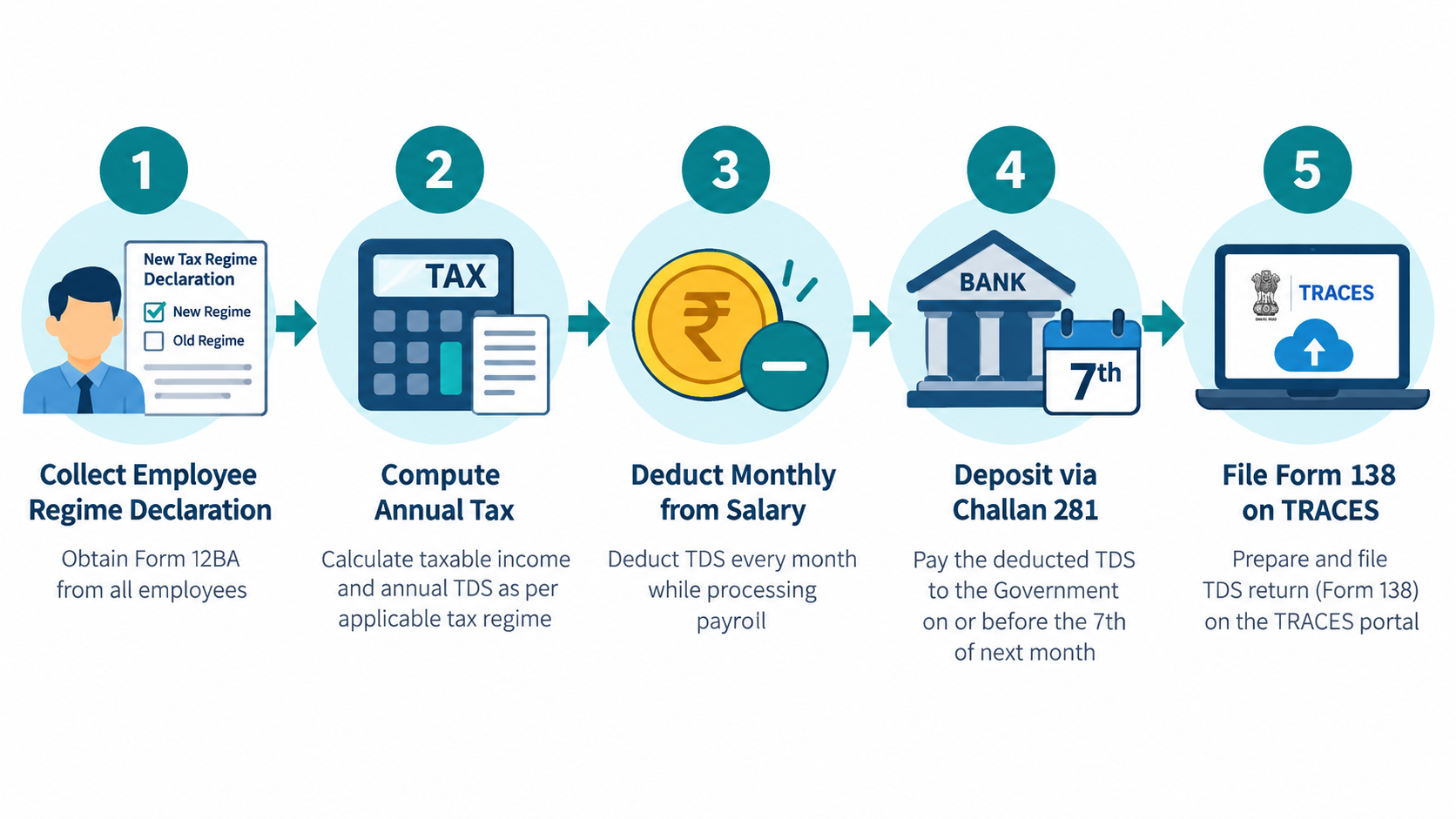
Step 1: Collect the employee’s regime declaration
Each employee must declare their chosen tax regime — old or new — to the employer. From FY 2026-27, the new regime is the default. If an employee has not submitted Form 12BAA declaring the old regime, apply new regime slabs.
Step 2: Compute projected annual gross salary
Take the April salary and project it across 12 months. Factor in expected bonuses, arrears, or increments that are known.
Step 3: Apply deductions
- New regime: Standard deduction of ₹75,000; no 80C, 80D, or HRA exemptions.
- Old regime: Standard deduction ₹50,000, plus HRA exemption, 80C (up to ₹1.5 lakh), 80D (health insurance up to ₹25,000/₹50,000 for senior parents), LTA, Professional Tax deduction.
Step 4: Compute annual tax liability
Apply applicable slab rates plus surcharge and 4% health and education cess.
Step 5: Divide by remaining months
If you are computing for Q2 and an employee joined in April, divide annual tax by 12. If they joined in July, divide by 9. Monthly TDS = Annual tax ÷ remaining months in FY.
If you are managing payroll for 50+ employees across two tax regimes, doing this manually in Excel is where mistakes happen. EZHRM’s TDS-aware payroll system auto-computes this per employee and generates Form 138 data directly — no manual re-entry into RPU.
How to File Form 138 on TRACES: Step-by-Step
The filing interface has changed from the old TIN-NSDL portal. As of April 2026, Form 138 is filed through the updated TRACES portal. Here is the process:
Step 1: Prepare the return file using RPU
Download the Return Preparation Utility (RPU) for FY 2026-27 from the TRACES portal. Enter employer TAN details, employee-wise data (PAN, salary paid, TDS deducted), and challan details for the quarter.
Step 2: Validate using FVU
Run the generated file through the File Validation Utility (FVU). This catches PAN mismatches, challan errors, and missing employee data. Do not skip this step — incorrect PAN details trigger a Section 271H penalty even if you file on time.
Step 3: Upload on TRACES
Log into TRACES with your TAN credentials. Under “Statements / Payments”, select Form 138 for Q2 FY 2026-27 and upload the validated .fvu file.
Step 4: Authenticate with DSC or EVC
Companies registered under the Companies Act must use a Digital Signature Certificate (DSC). Other deductors can use EVC (Aadhaar OTP or bank account validation).
Step 5: Download the acknowledgement
After successful upload, download the acknowledgement number (also called token number). Keep this as proof of filing. Your payroll compliance records should retain this along with challans for at least 7 years.
Penalties for Getting This Wrong
Missing the October 31 deadline is expensive, and the costs add up quickly:
| Offence | Penalty | Section |
|---|---|---|
| Late filing of Form 138 | ₹200 per day of delay, capped at total TDS for the quarter | Section 234E (Income Tax Act 2025) |
| Significant delay or incorrect filing | Minimum ₹10,000, up to ₹1,00,000 | Section 271H |
| Late deposit of monthly TDS | 1.5% per month (penal interest) on TDS amount | Section 201(1A) |
| Non-deduction of TDS | Disallowance of 30% of the salary expense in IT assessment | Section 40(a)(ia) |
To avoid Section 271H, file the return within one month of the due date and ensure all tax, interest, and fees are paid. The Assessing Officer has discretion here — a first-time delay with self-correction often avoids the heavy penalty, but you do not want to test that.
What HR Managers Get Wrong with Form 138 / 24Q Filing
- Using old Form 24Q for Q1/Q2 returns: Some HR teams used legacy payroll software that still generated 24Q output. That file was rejected on TRACES. Always verify your software vendor has updated to Form 138 for FY 2026-27.
- PAN not updated for new joinees: TDS is deducted at a flat 20% (higher rate) if employee PAN is missing or incorrect. Collect PAN at the time of onboarding, not after salary is processed.
- Ignoring Form 12BAA submissions: Employees who want the old regime must submit Form 12BAA. If they don’t, you default to new regime. Communicate the declaration deadline clearly in April each year.
- Challan mismatch: The Challan BSR code, date, and serial number in Form 138 must match exactly what is on the Challan 281 receipt. Even a single-digit error causes the return to be rejected.
- Missing exit employees: If an employee resigned in July or August, their salary for those months must still appear in Q2 Form 138. Do not exclude them just because they have left.
- Not filing when no TDS was deducted: If all your employees fall below the basic exemption limit and no TDS was deducted, you still need to file a nil return. Non-filing attracts Section 234E fees.
FAQ: Form 138 / Salary TDS Return for Q2 2026-27
Q1. Is Form 138 the same as Form 24Q?
Functionally yes — it serves the same purpose of reporting quarterly TDS on salary. Form 138 is the new name under the Income Tax Act 2025, effective from April 1, 2026. The structure, filing frequency, and logic are similar, but section references and rule numbers have changed. Use Form 24Q only for corrections or revisions of returns filed for FY 2025-26 or earlier.
Q2. What if my payroll software still generates Form 24Q?
Contact your vendor immediately. TRACES will not accept Form 24Q for Q1 or Q2 FY 2026-27. You need to either update your software or prepare the return manually using the new RPU available on TRACES. Most reputable payroll software platforms have already updated by now — if yours has not, that is a red flag about its compliance posture.
Q3. How do I handle an employee who switched tax regimes mid-year?
Employees can declare their regime change only once during the year to the employer — typically at the start of the FY. If an employee missed submitting Form 12BAA in April, they are stuck with the new regime for that employer for the full year. They can choose the old regime when filing their own ITR, but you deduct TDS as per new regime throughout.
Q4. What is the deadline for depositing September 2026 TDS before filing Q2?
September salary TDS must be deposited by October 7, 2026. The Q2 Form 138 return is due October 31. You have time to collect the September challan details before filing. Do not file the return before the September deposit is done — the challan must already be in TRACES to appear in the filing.
Q5. What documents do I need to file Form 138?
You need: employer TAN, employee PANs, salary details (gross paid, TDS deducted) for each employee for July–September 2026, and Challan 281 details (BSR code, date, amount, serial number) for each monthly deposit. For government deductors, book entry particulars replace Challan details.
Q6. Can I file Form 138 without a CA?
Yes. Employers can file directly on TRACES using their TAN login and DSC. Most HR and payroll software with TDS filing features auto-prepares the return file. A CA is helpful for complex scenarios — multiple payroll locations, mid-year acquisitions, or correcting past returns — but routine Q2 filing is well within an HR manager’s capability with the right tool.
Filing Form 138 is straightforward once your payroll data is clean and your software is updated. If you are still manually tracking TDS workings in Excel, the Q2 deadline is a good moment to rethink that. EZHRM’s TDS & Form 16 module auto-computes salary TDS per employee per regime, generates Form 138-ready data, and keeps your compliance calendar on track — so October 31 becomes a non-event, not a fire drill.